Built for the fire service

Skills testing,finally organized.

Evolution coordinates every station, company, and proctor on practical test day — from dispatch to results export — so coordinators can focus on training, not logistics.

3
Interfaces
100%
Offline-ready
Live
Progress tracking
Firefighter recruit — Evolution skills testing platform

Everything test day demands

From a configurable skills library to tablet-optimized proctor flows, Evolution handles the full operational lifecycle.

📋
Configurable skills library
Define checklist-based skills with flexible pass criteria — all items, critical only, percentage thresholds, or minimum counts. Reusable across events.
🗂️
Station template management
Build reusable station definitions with organized skill groups and sets. Mix team skills and individual evaluations within a single station.
📍
Live coordinator dashboard
Track every company against every station in a real-time matrix. See occupancy, progress, and assignment recommendations at a glance.
📱
Tablet-friendly proctor app
Proctors step through a configurable workflow on any tablet or mobile device. Station PINs provide quick field access on top of proctor account credentials.
📶
Offline sync & idempotency
Client mutations queue locally and sync with retry and backoff. Server-side idempotency means no duplicate data even across spotty networks.
📊
Excel export & reporting
Generate on-demand Excel workbooks with company summaries and per-candidate detailed results. Archived snapshots preserve historical test data.

See it in action

Every interface is purpose-built for its user — coordinator, proctor in the field, or training administrator.

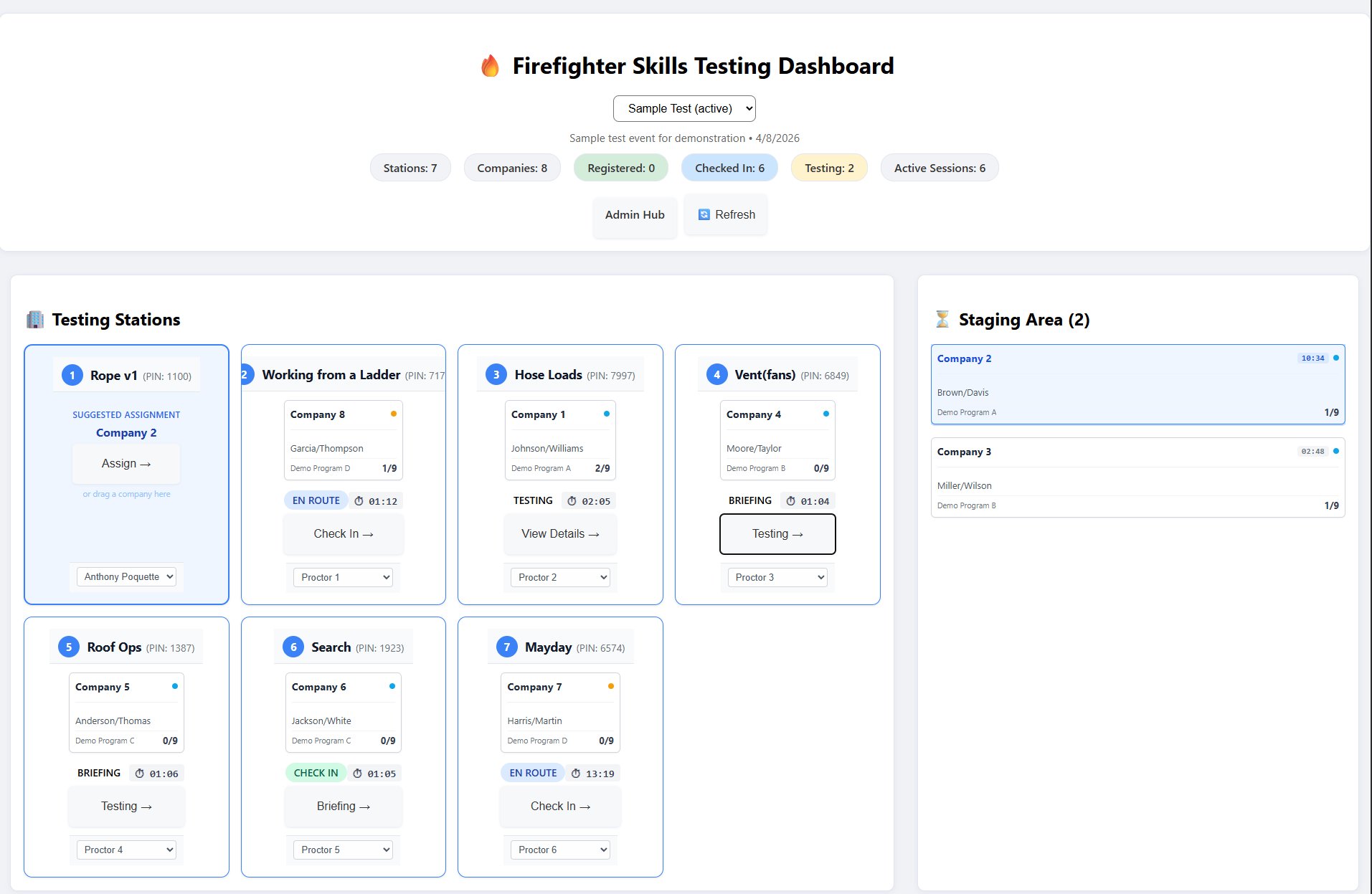
evolution.app / — Coordinator Dashboard
Evolution coordinator dashboard showing 7 testing stations with live company assignments and status badges
Each station card shows the current company, proctor assignment, live workflow status, and a one-click action to advance.
The staging area holds companies waiting for an open station — suggested assignments keep the flow moving.
Header counts give an instant read on registered, checked-in, testing, and active session counts across the event.
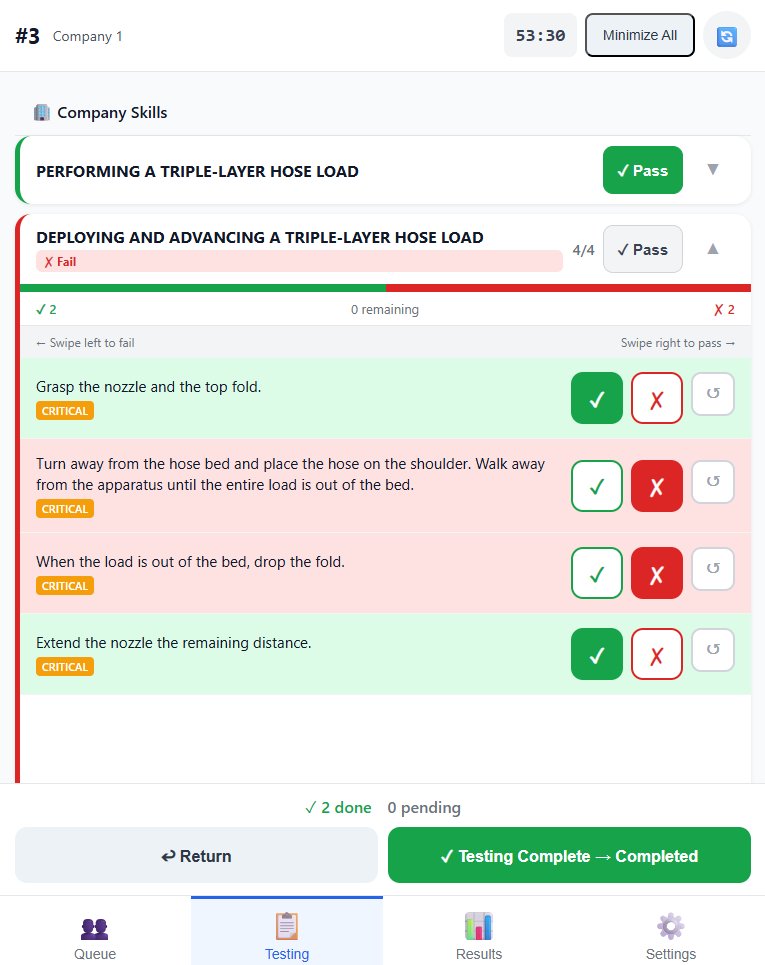
evolution.app /proctor
Evolution proctor app showing skill checklist with pass/fail buttons and critical item tags
1

Skill-by-skill evaluation

Each checklist item has a clear pass/fail control and a reset option. Critical items are tagged so nothing important gets missed.

2

Live pass/fail feedback

Skill cards update in real time as items are checked — green for passing, red for failing — so the result is always visible at a glance.

3

Session timer

A persistent timer tracks total session duration. Proctors can minimize individual skill groups to stay focused on what's in front of them.

4

Secure proctor access

Proctors authenticate with account credentials. Station PINs provide an additional layer of quick field access without sharing passwords.

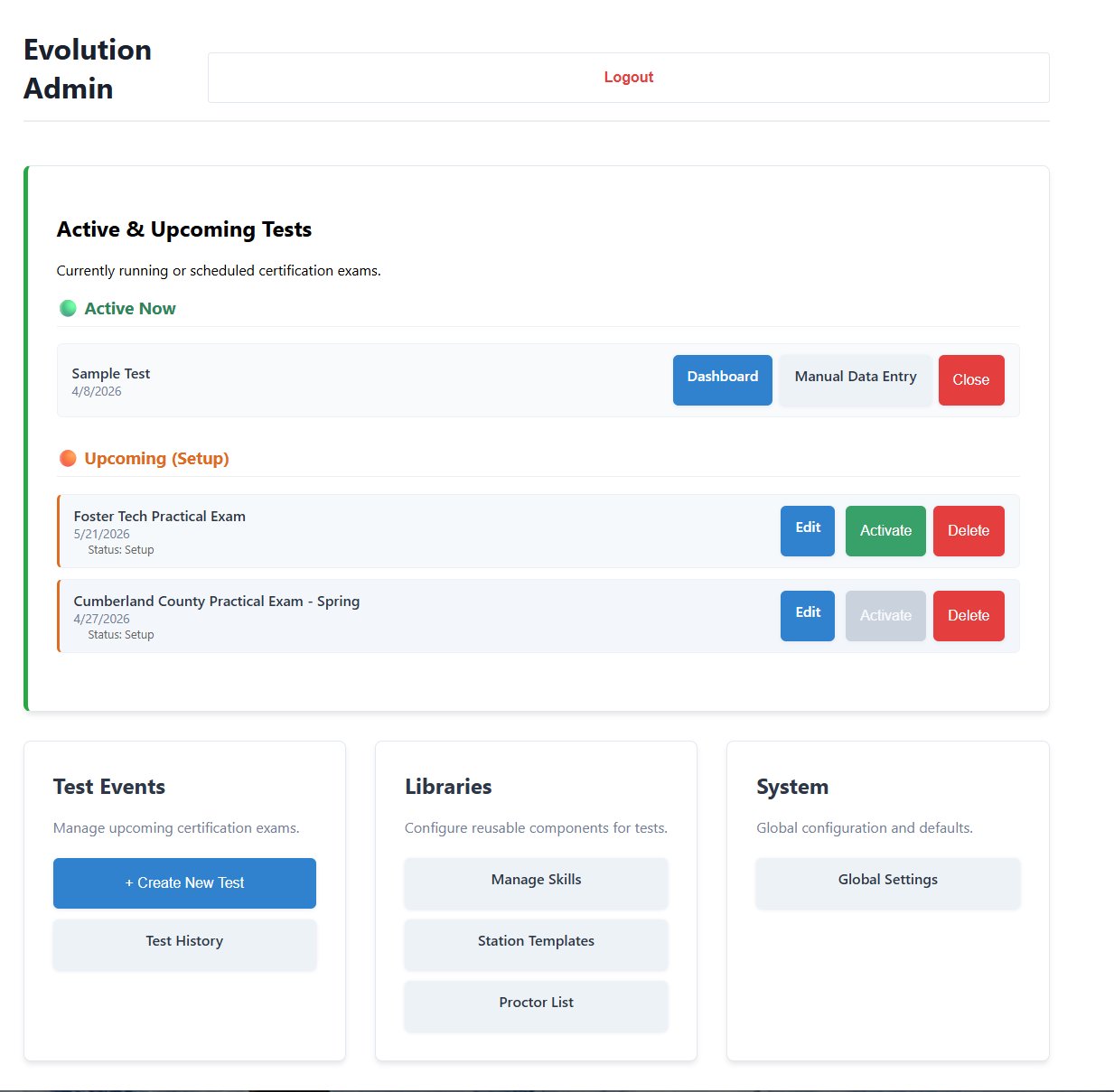
evolution.app /admin — Admin Setup
Evolution admin setup showing active and upcoming test events with shortcuts to skills library, station templates, and global settings
Active and upcoming events are visible at a glance — jump straight to the coordinator dashboard or manual data entry from any event row.
The Libraries section is where reusable skills, station templates, and proctor accounts are built and maintained across all events.
Global Settings controls system-wide defaults, keeping configuration consistent without touching individual event setups.

Who uses Evolution

Three purpose-built interfaces so every person on test day has exactly what they need.

Test Coordinators
  • Monitor all stations and companies in one view
  • Assign companies to open stations in real time
  • Track overall progress and spot bottlenecks instantly
  • Export results to Excel when testing wraps
Station Proctors
  • Secure account login with station PIN for fast field access
  • Step through a configurable workflow per session
  • Evaluate skills via touch-friendly checklists with critical item tagging
  • Works offline — syncs automatically when reconnected
Training Administrators
  • Build and maintain a reusable skills library
  • Configure station templates with groups and sets
  • Manage candidate rosters and company assignments
  • Set flexible pass criteria per skill

From setup to results export

Evolution handles the full test day lifecycle end to end.

1

Build the event

Configure stations, assign skill templates, import candidate rosters, and set proctor accounts and PINs before test day.

2

Coordinate live

Assign companies to open stations from the dashboard. Live status updates keep the flow moving without radio chatter.

3

Proctors evaluate

Proctors work through dispatch, check-in, briefing, and testing on a tablet. Every checklist item is logged and submitted automatically.

4

Export results

Generate a full Excel workbook of pass/fail results per candidate per station. Archived snapshots are retained for records.

/ — Coordinator Dashboard
Live coordination view
Company × station matrix with live status, occupancy tracking, and suggested assignments.
/admin — Admin Setup
Configuration hub
Manage events, skills library, station templates, proctor accounts, and global settings.
/proctor — Proctor App
Field interface
Account login with station PIN access, configurable workflow navigator, and touch-optimized skill checklists. Fully offline-capable.

Let's talk

Reach out with questions or request a live walkthrough — we'll get back to you within one business day.

Send us a message
Questions, pricing inquiries, deployment help — anything.

Message received

We'll get back to you within one business day.

Request a demo
See Evolution running on a live event with realistic test data — every interface, start to finish.

Demo request received

We'll reach out within one business day to schedule a time.